
When I was preparing for my first database interview, I was asked a question that sounded easy: “Name the DBMS models and explain the network model.” I could name them. Explaining the network model in DBMS properly was another story. Most notes I had read gave me three lines and a list of points, and none of them showed how it actually worked.
This guide is the explanation I wish I had back then. We will cover what the network model is, where it came from, how it stores data with a simple college example, its advantages and disadvantages, and how the same example looks in today’s SQL.
Last reviewed: November 2026
In this guide:
- What is the network model in DBMS?
- A short history
- How the network model works (college example)
- Features
- Advantages and disadvantages
- Hierarchical vs network vs relational
- The same example in SQL
- Is the network model still used?
- FAQs
What Is the Network Model in DBMS?
The network model in DBMS is a way of organising data where records are connected to each other through links, and one record can be linked to many parents and many children. A database built on this model is often called a Network Database Management System, or NDBMS.
To understand why that matters, think about the model that came before it. In the hierarchical model, data is stored like a family tree. Every child has exactly one parent. That works for simple things, like a company with departments and employees, but real life is rarely that neat.
Take a college. One student joins many courses, and one course has many students. In a tree, you cannot show this without copying the same student or course again and again. The network model solves that problem. Instead of a tree, the data looks like a web, or a graph, where links can go in many directions.
A simple way to picture it is the Indian Railways map. A station like Itarsi is not “under” one city. Trains from Delhi, Mumbai, Chennai and Howrah all pass through it. The stations are the records, and the railway lines are the links. You reach any station by travelling along the lines. That is exactly how a program reads data in a network database.
Key Terms in the Network Model
| Term | Meaning | College example |
|---|---|---|
| Record | One row of data, like a single entry | Student “Rahul” |
| Record type | A group of similar records, like a table | Student, Course, Faculty |
| Set | A named one-to-many link between two record types | TEACHES (Faculty to Course) |
| Owner | The “one” side of a set, the parent | Faculty “Dr. Mehta” |
| Member | The “many” side of a set, the child | Courses taught by Dr. Mehta |
| Pointer | A stored address that links one record to the next | The link from a course to its next course |
Remember this one line and the rest becomes easy: a set is a link from one owner to many members, and a record can be a member of many different sets. That last part is what allows many parents.
A Short History of the Network Model
The network model was created by Charles Bachman. In the early 1960s, while working at General Electric, he led the team that built the Integrated Data Store (IDS), released around 1964. It was one of the first real database systems.
His ideas were then standardised by a group called CODASYL (the same body behind the COBOL language). Its Data Base Task Group published the network model specification in 1969 and a major update in 1971. Because of this, you will also see it called the CODASYL model. Bachman later received the Turing Award in 1973, often called the Nobel Prize of computing, for his work on databases.
One common mistake in many notes is to say IBM introduced the network model. IBM’s famous database of that time, IMS, actually used the hierarchical model. The network model came from Bachman’s work and CODASYL.
The best-known network database product is IDMS, which grew out of IDS in the early 1970s. Network databases were very popular on mainframes through the 1970s. In the 1980s, the relational model (RDBMS) slowly replaced them, for reasons we will see below.
How the Network Model in DBMS Works: A College Example
Let us design a small college database using the network model. We need to store faculty, courses and students, and we need to answer two questions:
- Which courses has Rahul joined?
- Who studies SQL Basics, and who teaches it?
Step 1: Decide the Record Types
- Faculty: Dr. Mehta, Prof. Iyer
- Course: SQL Basics, Data Structures, Python
- Student: Rahul, Priya, Aman
Step 2: Connect Them with Sets
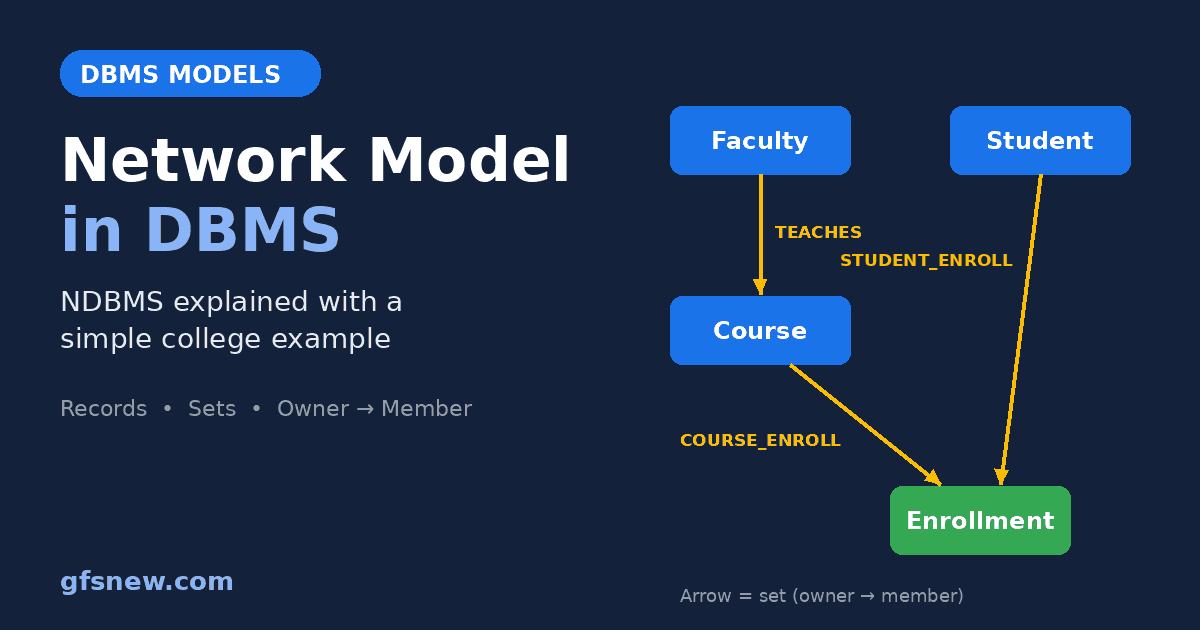
One faculty member teaches many courses, so we create a set called TEACHES. Faculty is the owner and Course is the member.
Students and courses are trickier. This is a many-to-many relationship, and a set can only be one-to-many. The network model handles this with a small extra record in the middle, called a link record (or junction record). We will call it Enrollment. Each Enrollment record means “this student is in this course”.
Now we create two more sets:
- STUDENT_ENROLL: Student is the owner, Enrollment is the member.
- COURSE_ENROLL: Course is the owner, Enrollment is the member.
Look at the diagram above. The Enrollment record has two owners: a student and a course. In a hierarchical tree, that is impossible. In the network model, it is normal. This is the single most important idea to remember for exams and interviews.
Step 3: Store the Data
| Student | Courses joined |
|---|---|
| Rahul | SQL Basics, Data Structures |
| Priya | SQL Basics, Python |
| Aman | Data Structures |
Dr. Mehta teaches SQL Basics and Python. Prof. Iyer teaches Data Structures. So we store five Enrollment records, one for each pair in the table above. Each one is joined to its student and to its course with pointers.
Step 4: Read the Data by Navigating
Here is the part most notes skip. In a network database, you do not write one query that says “give me Rahul’s courses”. Instead, your program walks from record to record along the links, one step at a time. This is called navigational access.
To answer “Which courses has Rahul joined?”, the program does this. The commands below are simplified, in the style of the old CODASYL language, just to show the idea:
FIND Student WHERE name = 'Rahul'
LOOP
    FIND NEXT Enrollment WITHIN STUDENT_ENROLL   -- go to Rahul's next enrollment
    IF no more records THEN EXIT
    FIND OWNER WITHIN COURSE_ENROLL               -- jump up to its course
    GET Course                                    -- read the course name
    PRINT Course.name
END LOOP
Output: SQL Basics and Data Structures.
Notice how the programmer must know the exact path: start at the student, go down one set, then up another set. Bachman himself described this as the programmer being a “navigator” through the database. It is fast, because the database just follows stored addresses. But it also means the programmer has to understand the full structure of the data.
Features of the Network Model in DBMS
- Graph structure: Data is arranged as a web of records and links, not a single tree.
- Many parents allowed: A record can be a member of several sets, so it can have more than one owner.
- Owner-member sets: Every relationship is a named one-to-many set.
- Many-to-many through link records: A record in the middle connects two owners.
- Pointer-based links: Relationships are stored as physical addresses, not as matching values.
- Navigational access: Programs move record by record along the sets.
- Schema defined in advance: Record types and sets must be planned before data is stored.
Advantages of the Network Model
- Handles many-to-many relationships: Students and courses, products and suppliers, flights and passengers can all be modelled naturally.
- Less duplicate data than the hierarchical model: A record is stored once and linked from many places, instead of being copied under each parent.
- Very fast for known paths: Following a stored pointer is quick. For the same, repeated questions, like printing every student’s courses each night, it can be faster than searching.
- Strong data integrity: A member cannot exist without its owner in a set, so you cannot have an enrollment that points to a course that does not exist.
- Shared data: Many programs can use the same database at the same time.
Disadvantages of the Network Model
- Complex to design: You must plan every record type and set before you start. For a big system, the diagram quickly becomes a confusing web.
- Hard to change: Adding a new relationship later can mean changing the structure and rewriting the programs that navigate it.
- No simple query language: There is nothing like SQL. A new question needs new navigation code, written by a programmer.
- Programs depend on the structure: Because code follows exact paths, a change in the data layout can break the code. This is called a lack of data independence.
- Harder to learn: Developers need to understand pointers and sets, which takes far longer than learning a SELECT statement.
These disadvantages are exactly why the relational model won. When Edgar Codd proposed it in 1970, his big idea was that you should describe what data you want and let the database work out how to get it. As computers became faster in the 1980s, the speed benefit of pointers mattered less, and the simplicity of SQL mattered more.
Hierarchical vs Network vs Relational Model
| Point | Hierarchical | Network | Relational |
|---|---|---|---|
| Structure | Tree | Graph (web) | Tables |
| Parents per record | Only one | Many | Not needed, uses keys |
| Many-to-many | Not supported directly | Supported with link records | Supported with junction tables |
| How links are stored | Pointers | Pointers | Matching key values |
| How you read data | Navigate the tree | Navigate the sets | Write a SQL query |
| Ease of change | Hard | Hard | Easy |
| Example product | IBM IMS | IDMS | SQL Server, MySQL, Oracle |
The Same College Example in SQL
Here is the best way to really understand the network model in DBMS: build the same college example in a relational database and compare. You can run this in SQL Server, MySQL or SQLite.
CREATE TABLE Faculty (
    faculty_id   INT PRIMARY KEY,
    faculty_name VARCHAR(50) NOT NULL
);

CREATE TABLE Student (
    student_id   INT PRIMARY KEY,
    student_name VARCHAR(50) NOT NULL
);

CREATE TABLE Course (
    course_id   INT PRIMARY KEY,
    course_name VARCHAR(50) NOT NULL,
    faculty_id  INT NOT NULL REFERENCES Faculty(faculty_id)
);

CREATE TABLE Enrollment (
    student_id INT NOT NULL REFERENCES Student(student_id),
    course_id  INT NOT NULL REFERENCES Course(course_id),
    PRIMARY KEY (student_id, course_id)
);

INSERT INTO Faculty VALUES (1, 'Dr. Mehta'), (2, 'Prof. Iyer');

INSERT INTO Student VALUES (101, 'Rahul'), (102, 'Priya'), (103, 'Aman');

INSERT INTO Course VALUES
    (11, 'SQL Basics', 1),
    (12, 'Data Structures', 2),
    (13, 'Python', 1);

INSERT INTO Enrollment VALUES
    (101, 11), (101, 12),
    (102, 11), (102, 13),
    (103, 12);
Each network set has become a foreign key. The TEACHES set is the faculty_id column in Course. The Enrollment link record is now a junction table with two foreign keys. The idea is the same. Only the way the link is stored has changed, from a pointer to a matching value.
Question 1: Which courses has Rahul joined?
SELECT c.course_name
FROM Student s
JOIN Enrollment e ON e.student_id = s.student_id
JOIN Course c     ON c.course_id  = e.course_id
WHERE s.student_name = 'Rahul'
ORDER BY c.course_name;
course_name
---------------
Data Structures
SQL BasicsQuestion 2: Who studies SQL Basics, and who teaches it?
SELECT s.student_name, f.faculty_name
FROM Course c
JOIN Faculty f    ON f.faculty_id = c.faculty_id
JOIN Enrollment e ON e.course_id  = c.course_id
JOIN Student s    ON s.student_id = e.student_id
WHERE c.course_name = 'SQL Basics'
ORDER BY s.student_name;
student_name | faculty_name
-------------+-------------
Priya | Dr. Mehta
Rahul | Dr. MehtaI ran both queries on this exact data, and these are the real results. Compare them with the navigation code earlier. In SQL, you just describe the answer you want. You never say “go to the next record” or “jump to the owner”. The database does the walking for you. That one difference is why almost every company moved to relational databases.
If you want to go deeper into how these tables are designed without duplicate data, read our guide on normalization in SQL.
Is the Network Model Still Used Today?
Yes, more than most people think, but quietly.
- Old mainframe systems: IDMS is still sold and supported today (it is now owned by Broadcom). Some large banks, insurers and government offices still run decades-old systems on it, because rewriting them is risky and expensive.
- Its ideas live on in graph databases: Modern graph databases such as Neo4j also store data as connected nodes and follow links between them. They are not the same as CODASYL databases. They have their own query languages and are far more flexible. But the core thought, “data is a web of relationships”, is the same one Bachman had in the 1960s.
For a new project today, you would almost never choose a pure network database. You would use a relational database for most business data, and a graph database when relationships are the main thing you query, like social networks or fraud detection.
Network Model Points for Exams and Interviews
If you have only two minutes before an exam, remember these:
- Created by Charles Bachman (IDS at GE), standardised by CODASYL in 1969 and 1971.
- Data is a graph. A record can have many owners, unlike the hierarchical model.
- Relationships are sets with one owner and many members, stored as pointers.
- Many-to-many relationships use a link record in the middle.
- Data is read by navigation, not by a declarative query language.
- Replaced by the relational model because it was complex and hard to change.
For more practice questions, see our SQL interview questions.
Conclusion
The network model in DBMS was a big step forward from the hierarchical model. By letting a record have many owners, it could finally represent real-world relationships like students and courses without copying data. Its weakness was that programmers had to navigate the data by hand, which made systems hard to build and harder to change.
The relational model kept the good idea, connected data, and removed the hard part, manual navigation. When you write a JOIN in SQL today, you are doing in one line what a network database programmer once did in a whole loop. If you want to read more about the original design, the network model page on Wikipedia is a good next step.
FAQs on the Network Model in DBMS
Q1: What is NDBMS?
NDBMS stands for Network Database Management System. It is a database that stores data using the network model, where records are linked through owner-member sets and one record can have many parents.
Q2: Who introduced the network model in DBMS?
Charles Bachman created it while building the Integrated Data Store at General Electric. The CODASYL Data Base Task Group then standardised it in 1969 and updated it in 1971.
Q3: What is the main difference between the hierarchical and network model?
In the hierarchical model, every record has only one parent, so data forms a tree. In the network model, a record can have many parents, so data forms a graph.
Q4: What is a set in the network model?
A set is a named one-to-many relationship between two record types. The “one” side is called the owner and the “many” side is called the member.
Q5: Can the network model handle many-to-many relationships?
Yes. It uses a link record in the middle that is a member of two sets, one for each side of the relationship.
Q6: What is an example of a network database?
IDMS is the best-known example. It is still used on some mainframe systems today.